

How to Isolate Vocals from a Song: Clean Stems Without Watery Artifacts
Step-by-step guide to isolating vocals from mixed tracks, eliminating phase residue and bleed, and prepping clean acapellas for production.
By Vocalist.ai Editorial Team · August 27, 2026 · 5 min read
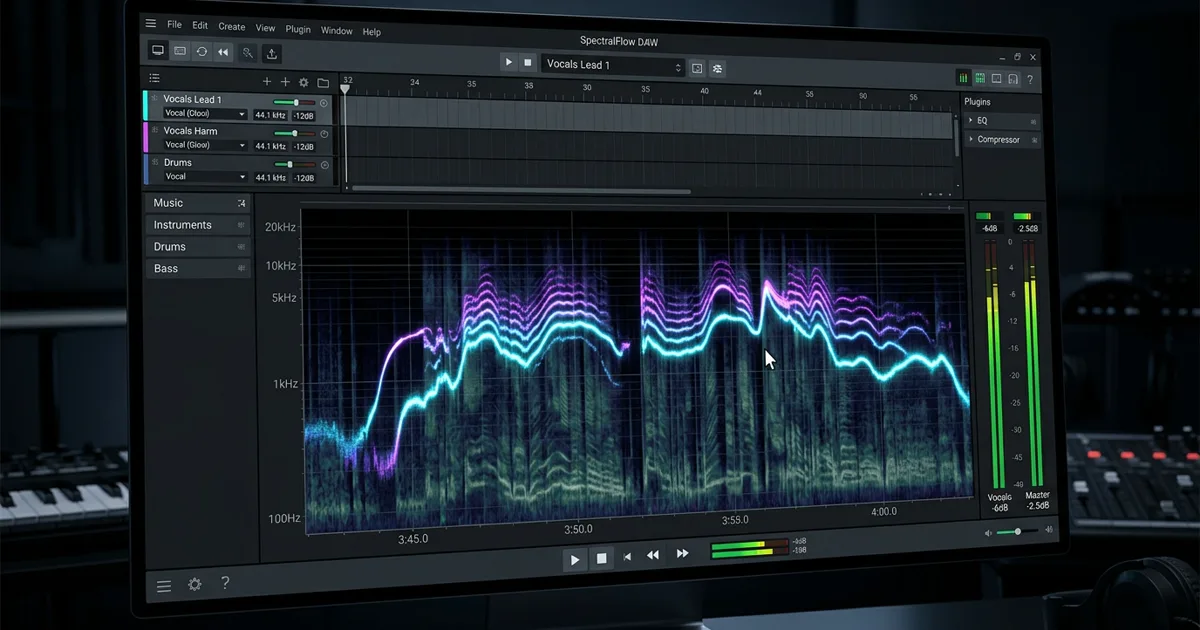
Isolating a vocal from a completed song used to require clumsy phase-cancellation tricks that left vocals hollow, tinny, and buried in cymbal noise.
Modern deep-learning source separation models have dramatically changed this workflow. Neural networks trained on multitrack audio can now identify vocal harmonic structures and separate them from complex stereo mixes with remarkable clarity.
However, even advanced stem separation algorithms can leave behind telltale artifacts: watery high-frequency phase flanging, cymbal bleed during quiet vocal passages, and smeared reverb tails.
If you are isolating vocals for remixing, sampling, or vocal transformation, here is how the technology works and how to extract the cleanest possible acapella.
How AI vocal isolation actually works
Traditional vocal removal relied on simple mid-side phase inversion: subtracting the left channel from the right channel to cancel out center-panned audio. While this occasionally muted the lead singer, it completely failed on stereo reverbs, stereo backing vocals, and centered instruments like kick and bass.
Modern stem splitters use deep neural networks (such as convolutional U-Net and transformer architectures) that analyze both the time-domain waveform and spectral frequency bins simultaneously.
The model analyzes the audio spectrogram and calculates which energy belongs to human vocal cords versus snare wires, guitar overtones, or bass fundamentals. It then reconstructs isolated stems - giving you a dedicated vocal track and an instrumental backing track.
Hear that separation across one source mix and its two outputs:
The original mixed track supplied to the stem splitter.
The vocal output separated from the same mix.
The backing-track output separated from the same mix.
Key Takeaway: AI separation is not a filter or EQ curve. It is a predictive neural reconstruction. The cleaner and less compressed the input audio, the more accurately the model can separate vocal harmonics from instrumental layers.
4 steps to get clean vocal isolation
Follow this diagnostic workflow to minimize artifacts when extracting vocals from a mix.
1. Start with uncompressed source audio
Whenever possible, feed your stem separator an uncompressed 24-bit WAV or AIFF file rather than a lossy MP3 or AAC.
Lossy compression algorithms achieve smaller file sizes by discarding frequencies that the human ear allegedly cannot perceive. In doing so, they blur harmonic boundaries between instruments and vocals. When a neural network attempts to separate an MP3, it has to guess across compressed spectral gaps, resulting in noticeably more metallic "chirping" artifacts in the high frequencies.
2. Diagnose and treat reverb tails
In almost every pop or rock mix, the lead vocal is processed with stereo reverb and delay. When the vocal stem is separated, those reverb reflections often smear across the background.
Standard stem separation models often struggle to decide whether a lingering reverb tail belongs to the voice or the room. If you plan to transform the vocal or drop it into a new arrangement, that baked-in room sound will clash with your new mix.
Using a dedicated de-reverberation workflow - such as Vocalist's Stem Splitter De-Reverb mode - strips both the backing instrumentation and room reflections simultaneously, giving you a truly dry stem.
The isolated vocal still carries the spatial treatment from the source mix.
The cleaner vocal prepared for downstream transformation.
3. Handle cymbal bleed and high-end sizzle
Cymbals, hi-hats, and tambourines share significant high-frequency space (4 kHz to 12 kHz) with vocal consonants like "s", "t", and "f". In loud choruses with heavy crash cymbals, minor bleed into the vocal stem is common.
To clean up residual bleed:
- Use dynamic EQ or multiband gating: Attenuate high frequencies strictly during silent spaces between vocal phrases.
- Manual silence editing: Zoom in on your DAW timeline and mute regions where the vocalist is not singing. Do not let background noise build up in the pauses.
- Avoid aggressive top-end boosting: Never add wide high-shelf EQ to an isolated vocal stem, as this will amplify separation residue.
4. Know when to tune and pitch correct
If the extracted vocal will be featured prominently in a remix or cover, check its pitch center against your new instrumental.
Because stem isolation can slightly alter the perceived fundamental frequency on quiet note endings, gentle pitch correction can stabilize the vocal. Read our guide on vocal pitch correction to learn how to lock pitch without flattening the singer's natural performance.
Evaluating isolation quality: Can you transform this vocal?
A common question among producers is whether an isolated stem is clean enough to feed into an AI vocal transformation model.
Use this quick evaluation rubric:
| Artifact Heard in Stem | Safe for Remixing? | Safe for Voice Transformation? | Recommended Action |
|---|---|---|---|
| Minor hi-hat tick in silent gap | Yes | Yes (after gating) | Cut silent regions in DAW before processing. |
| Noticeable stereo reverb tail | Yes | No | Run through De-Reverb mode before transformation. |
| Watery phase flange on high notes | Sometimes | No | Source mix was too dense or heavily compressed; seek cleaner master. |
| Heavy backing vocal bleed | Yes (as harmony) | No | Transformation requires single-voice input; cannot process layered vocals. |
Our AI vocal repair guide outlines why source contamination must be cleared before applying vocal models.
Conclusion
Stem separation technology has made extracting vocals easier than ever, but great results still depend on smart source selection and artifact cleanup. Start with uncompressed audio, remove lingering reverb tails, and edit out gaps to get release-ready vocal stems for your music.