

Vocal Pitch Correction: Tune Vocals Without Flattening the Performance
Learn when vocal pitch correction helps, how key and correction strength affect the result, and how to preserve slides, vibrato, and expression.
By Vocalist.ai Editorial Team · July 23, 2026 · 6 min read
Good vocal pitch correction fixes notes that distract from the song without erasing the movements that make the performance feel human. Hard correction is also a valid creative effect, but it should be a choice rather than an accident.
The central question is not whether a vocal is perfectly centered on every note. It is whether the listener hears the intended melody and emotion.
The Golden Rule of Tuning: Pitch correction should serve the song's genre and emotional intent. Natural tuning gently nudges pitch wandering toward the note centers, while creative tuning intentionally flattens transitional slides to create a tight, modern electronic texture.
What pitch correction can and cannot fix
Pitch correction identifies the sung pitch and moves it toward an allowed note. Depending on the tool and settings, that movement can be transparent or immediately audible.
It can help with:
- sustained notes that settle sharp or flat
- inconsistent centers between takes
- a note that misses its intended target
- deliberate hard-tuned effects
- preparing a guide performance for vocal transformation
It cannot fix:
- poor timing or unclear diction
- distortion and clipping
- room reverb or instrumental bleed
- unwanted harmonies or doubled voices
- an emotionally unsuitable performance
- a source melody far outside a target singer model's useful range
If tuning does not address the artifact you hear, use the broader AI-vocal repair checklist instead of increasing correction strength.
Choose the musical target first
A tuner needs to know which notes are acceptable. If you know the song's key and scale, selecting them narrows the available targets and can stop the system from pulling a note toward an unwanted chromatic neighbor.
Chromatic correction allows all twelve semitones. It is useful when:
- the song changes key
- the melody contains notes outside a simple scale setting
- you are unsure of the harmony and want conservative correction
However, chromatic mode does not understand the song's harmonic intention. A pitch sitting between two semitones may move to the nearer one even when the other note belongs in the chord.
Before processing the whole vocal:
- Confirm the instrumental's key where possible.
- Listen for borrowed notes and key changes.
- Test a phrase containing slides and sustained notes.
- Compare the result in the mix, not only in solo.
Vocalist Tune lets you choose a specific key and scale or leave the setting chromatic. Its current operating steps are documented in Using Tune.
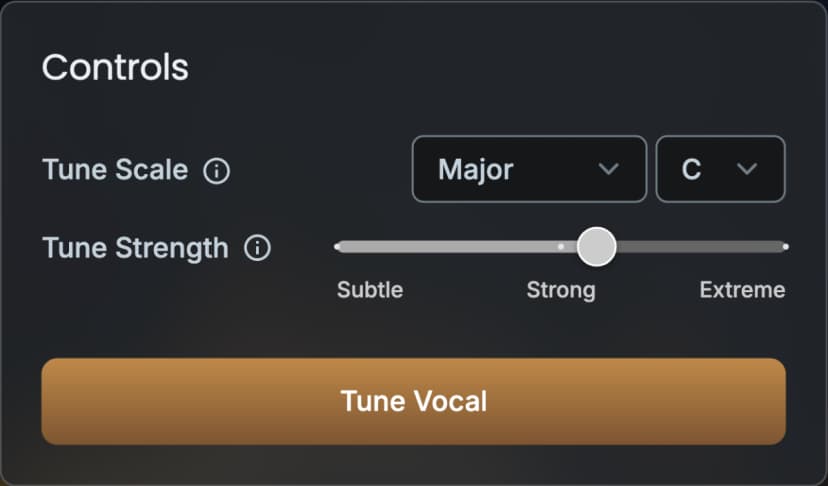
Vocalist Tune controls used to select the correction target and strength.
Correction strength changes the aesthetic
Correction strength controls how readily a pitch is pulled toward its target. Faster or stronger correction produces a more obvious locked-note effect. Gentler correction allows more of the original movement to pass.
For a natural result, begin subtly and increase correction only until the distracting notes sit correctly. For a deliberate electronic effect, stronger correction can become part of the arrangement.
The four clips below use the same performance. Start with the untreated take, then compare subtle and extreme correction. The wrong-key version shows why the musical target matters as much as correction strength.
The original performance before pitch correction.
The same take with restrained correction.
The same take with correction pushed for an obvious effect.
The same take deliberately corrected toward unsuitable note targets.
There is no universal perfect value. The same setting reacts differently to:
- a steady sustained note
- wide vibrato
- a slow slide between notes
- rapid ornamental runs
- breathy or noisy consonants
- a pitch that begins far from its destination
As independent audio publication Sound On Sound explains in its guides to vocal pitch editing and creative pitch processing, transparent pitch correction requires minimal, targeted intervention - distinguishing natural intonation fixes from the stepped, robotic effect created when aggressive automatic correction flattens every human micro-variation.
Preserve intentional movement
Not every deviation from the center line is a mistake.
Vibrato
Vibrato repeatedly moves above and below a central pitch. Heavy correction can narrow that motion or make it pulse unnaturally. Judge whether the vibrato's center supports the harmony before trying to eliminate its width.
Slides and note transitions
A singer may approach a note from below or connect two notes with a slide. Correction that reacts too quickly can turn that continuous gesture into a staircase. If the transition matters to the style, reduce the strength or correct only the note that actually misses.
Blue notes and intentional tension
Some performances use pitches between conventional scale targets for expression. A strict scale can reinterpret that tension as an error. Always compare against the harmony and genre rather than relying only on a visual pitch display.
Consonants and breaths
Unpitched sounds do not need melodic correction. Artifacts around consonants often indicate that the processor is reacting to material without a stable fundamental pitch. A cleaner input and less aggressive setting may help more than additional correction.
Tune before or during vocal transformation?
Either approach can work, but use a controlled comparison.
Tune the input first when:
- the source performance contains clear pitch errors
- you want to audition the corrected guide separately
- you need to distinguish tuning changes from transformation changes
Tune as part of transformation when:
- the source is already close to the intended melody
- you want one consistent processing pass
- you have tested that the combined result preserves the desired expression
Do not repeatedly tune an already corrected file unless the effect is intentional. Multiple aggressive passes can exaggerate locked transitions and make diagnosis harder.
A restrained pitch-correction workflow
- Comp first. Choose the strongest performance before fixing isolated notes.
- Use a clean vocal. Remove avoidable bleed and time-based effects from the input.
- Confirm the target. Set the key and scale, or choose chromatic mode deliberately.
- Start subtle. Increase strength until the errors stop distracting you.
- Audit expression. Check vibrato, slides, consonants, and note transitions.
- Listen in context. A tiny pitch movement that sounds exposed in solo may work naturally in the mix.
- Compare at equal loudness. Louder often sounds better even when tuning is worse.
- Keep the untreated source. You may need to revisit a phrase after the arrangement changes.
When stronger tuning is the right answer
Transparent correction is not inherently superior. If the production calls for a synthetic, tightly quantized vocal, use stronger settings confidently and arrange around that sound. The mistake is applying an extreme setting while expecting the result to remain invisible.
For natural correction, stop when the melody reads clearly and the performance still moves. For an effect, push until the tuning becomes a deliberate part of the track.