

Understanding Vocal Formants: Pitch Shifting Vocals Without Chipmunk Artifacts
Learn what vocal formants are, how formant shifting differs from pitch shifting, and how to transpose vocals while maintaining natural human resonance.
By Vocalist.ai Editorial Team · July 16, 2026 · 4 min read
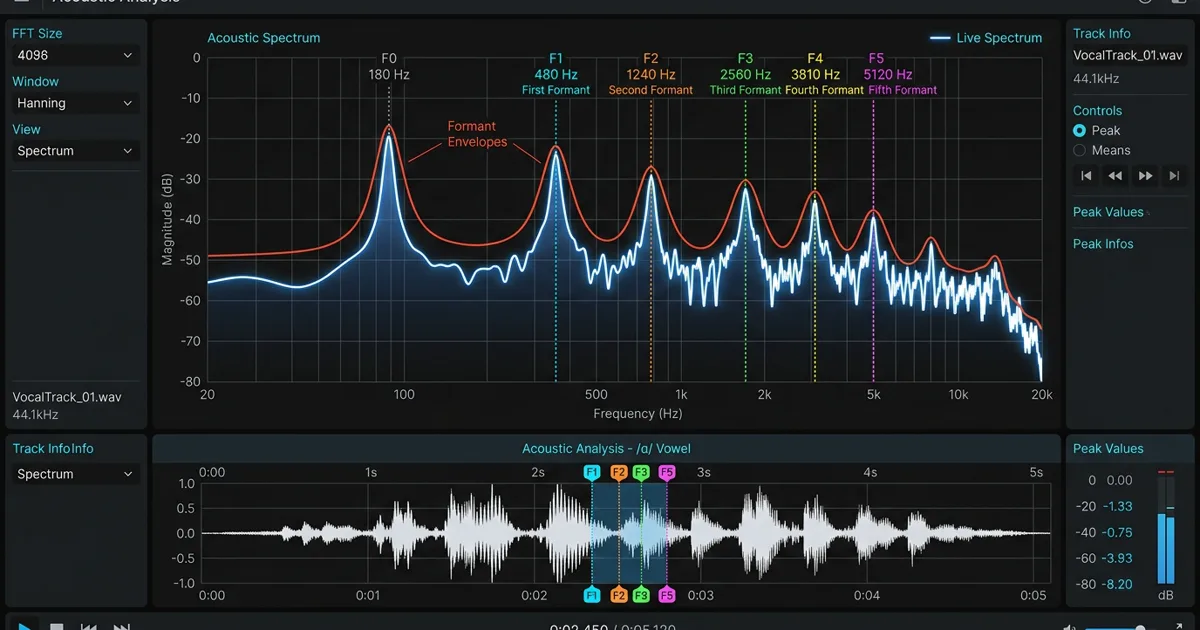
Anyone who has ever transposed a vocal track up by five or six semitones in a digital audio workstation knows the dreaded "chipmunk effect": the pitch goes up, but the singer suddenly sounds like an animated cartoon character. Pitch down by five semitones, and they sound like a sluggish giant.
This artifact does not happen because the pitch changed. It happens because traditional pitch shifting inadvertently shifts the vocal formants - the fixed acoustic resonant peaks created by the physical geometry of the human vocal tract.
Understanding what vocal formants are and how modern audio processing handles them is the secret to transparent vocal pitch correction, convincing pitch shifting, and realistic AI vocal transformation.
What is a vocal formant?
When you sing, sound originates in two distinct physiological stages:
- The Source (Vocal Cords): Air pushed from the lungs vibrates the vocal folds, generating a fundamental pitch (F0) along with a dense series of harmonic overtones. When you sing an A4 (440 Hz), your vocal cords vibrate 440 times per second.
- The Filter (Vocal Tract): That sound travels up through the pharynx (throat), oral cavity (mouth), tongue, lips, and nasal cavity. These anatomical spaces act as an acoustic resonator, naturally boosting certain frequency clusters while attenuating others.
Those reinforced frequency zones are called formants.
Regardless of whether you sing high or low, the physical length and shape of your throat and mouth remain relatively constant. The first two formants (F1 and F2) determine which vowel sound you are articulating (such as "ee" versus "ah"), while higher formants (F3, F4, and F5) define the unique timbral identity, brightness, and "singer's formant" of your personal voice.
The Acoustic Rule: Pitch is determined by how fast your vocal cords vibrate. Formants are determined by the physical size and shape of your vocal tract.
Why traditional pitch shifting ruins vocal timbre
In basic digital audio editing, shifting pitch historically meant speeding up or slowing down playback (varispeed). When digital pitch-shifting algorithms (like phase vocoders) were developed, they detached pitch from tempo, allowing you to change note values while keeping the rhythm locked to the beat.
However, unless an algorithm specifically compensates for formants, shifting a pitch up by 4 semitones also shifts every resonant formant peak up by the exact same mathematical ratio.
Shifting formants upward shrinks the perceived size of the singer's vocal tract, making the throat sound half as long - hence the chipmunk sound. Shifting formants downward expands the perceived vocal tract, making the singer sound abnormally massive.
Formants in AI vocal transformation
This is where singing voice conversion (SVC) departs radically from simple pitch-shifting plugins.
In academic research - such as Yamaha's TransVox research reports - singing-voice processing relies on neural acoustic feature extraction. A neural network separates the pitch contour (F0) from the spectral envelope (the formants and timbre).
When you use Vocalist to transform a vocal:
- The model tracks your exact incoming pitch, vibrato, and timing.
- It extracts performance information separately from much of the source singer's timbral character.
- It renders that performance with the learned timbre of the target singer model.
Because transformation models pitch and timbre separately, input pitch shifting can align a performance with the target model's range without simply shifting every formant by the same interval. Smaller shifts generally produce the most natural results.
Practical tips for managing formants in your vocal mix
When mixing and editing vocals in your DAW, use these practical techniques to keep formants sounding natural:
1. Separate pitch correction from formant correction
Modern pitch correction tools allow you to lock pitch without touching formants. If your singer drifted sharp on a sustained note, correcting the fundamental pitch while locking formants preserves the natural tone of their voice. Read our guide on vocal pitch correction to avoid over-correcting natural vocal character.
2. Use creative formant shifting for vocal doubles
If you want a vocal double to sound like a distinct backing singer rather than an identical clone of the lead, shift the formant by -1 or +1 semitone while keeping the musical pitch unchanged. This subtly alters the perceived throat size of the singer, creating natural separation in the stereo field.
3. Match vocal ranges with the Sweetspot Analyzer
Even with formant-preserving models, extreme pitch jumps force algorithms to stretch vowel definitions. Use Vocalist's Sweetspot Analyzer to verify that your guide vocal sits within the target model's comfortable register.
Conclusion
Formants are a major part of what makes each voice recognizable. By treating fundamental pitch and vocal-tract resonance as separate sonic elements, modern tools can transpose and transform vocals while retaining more natural resonance.